
RegAI Docs › RegAI Editor
Share with a client
You can share a document with a client, or anyone else, as a read-only link. They need no account and open it with the link plus an access code. The share shows the document as it was when you created it; later edits are not shown until you update the share.
Create a share
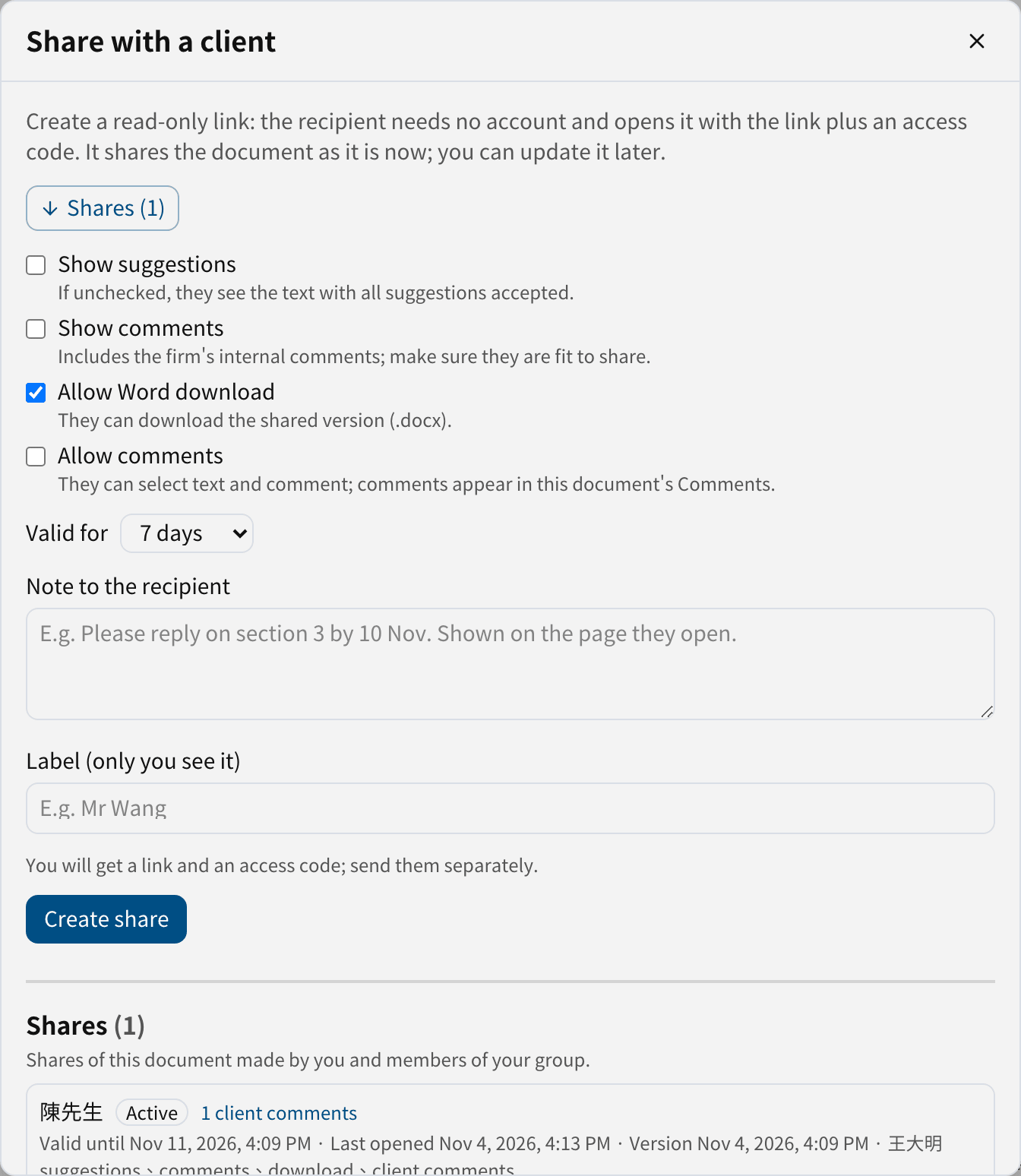
- Click Share at the top to open Share with a client.
- Choose what they see and can do:
- Show suggestions: if unchecked, they see the text with all suggestions accepted.
- Show comments: includes the firm's internal comments; make sure they are fit to share.
- Allow Word download: they can download the shared version (.docx).
- Allow comments: they can select text and comment; comments appear in your Comments.
- Choose Valid for (1 to 10 days; 7 by default).
- If you like, write a Note to the recipient (shown on their page) and a Label (only you see it, e.g. their name).
- Click Create share.
Send the link and the code
Once created, the dialog shows the Link and the Access code, each with a Copy button.
Caution: send the link and the access code separately, for example the link by email and the code by LINE or phone, never in the same message. The code is shown only once; if it is lost, use Reset code.
Manage shares
Shares are listed under Shares at the bottom of the dialog, with their status, end date, when they were last opened and the number of client comments.

- Update to current version: shows your later edits; the link and code stay the same. The client sees it after reloading the page.
- Edit note: changes the note to the recipient.
- Extend: valid for 1 to 10 days from today.
- Reset code: the old code stops working at once, anyone viewing is signed out, and any lock is lifted.
- Revoke: the link stops working at once and any open page closes. This cannot be undone.
Wrong codes
After 5 wrong codes in a row, the client must wait 15 minutes; after 10 in all, the share is locked and shows Locked (reset the code). Resetting the code unlocks it.
For what the client sees, see What the client sees.