
RegAI Docs › RegAI Editor
Create a document
RegAI Pro featureLast updated: 2026-11-04
Blank, or from a Word file
- Choose the workspace in the sidebar.
- In the Documents bar, click New document.
- Choose Blank document, or From a Word file (.docx)… and pick the file.
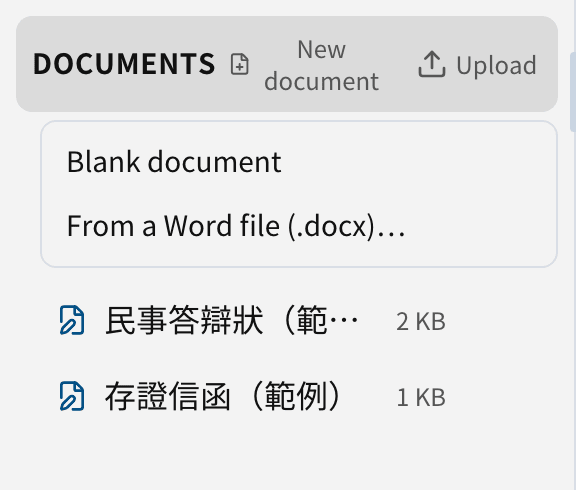
The new document opens at once. Only .docx files are supported; save an old .doc file as .docx in Word first.
Open an uploaded Word file
A .docx file already uploaded to the workspace has an Open in RegAI Editor icon next to it. It creates a new RegAI Editor document; the uploaded file stays as it is.
Tracked changes and comments from Word
If the Word file has tracked changes and comments, they come in too:
- Each tracked change becomes a suggestion under its Word author, for example "Lin (Word)".
- Comments, with their replies, become RegAI Editor comments.
- Formatting changes RegAI Editor cannot show (alignment, indents, fonts) are applied, not listed as suggestions.
When the import finishes, a notice tells you how many changes and comments came in, and which comments were left out because their text could not be found.
Storage
RegAI Editor documents count toward the workspace's storage. See Pricing for the allowance.
Was this page helpful?