
RegAI Docs › RegAI Editor
RegAI Editor
RegAI Editor lets you draft and revise briefs and other documents right in a workspace, and keeps track of every change: your edits and your colleagues' can be recorded as suggestions, RegAI can propose suggestions with reasons, and you export the result to Word.
Who can use it
RegAI Editor is a RegAI Pro feature. See Pricing for the plans.
Where documents live
RegAI Editor documents are in the workspace's Documents, listed with the files you uploaded. Click a document to open it in RegAI Editor; Back to chat at the top left returns to the workspace.
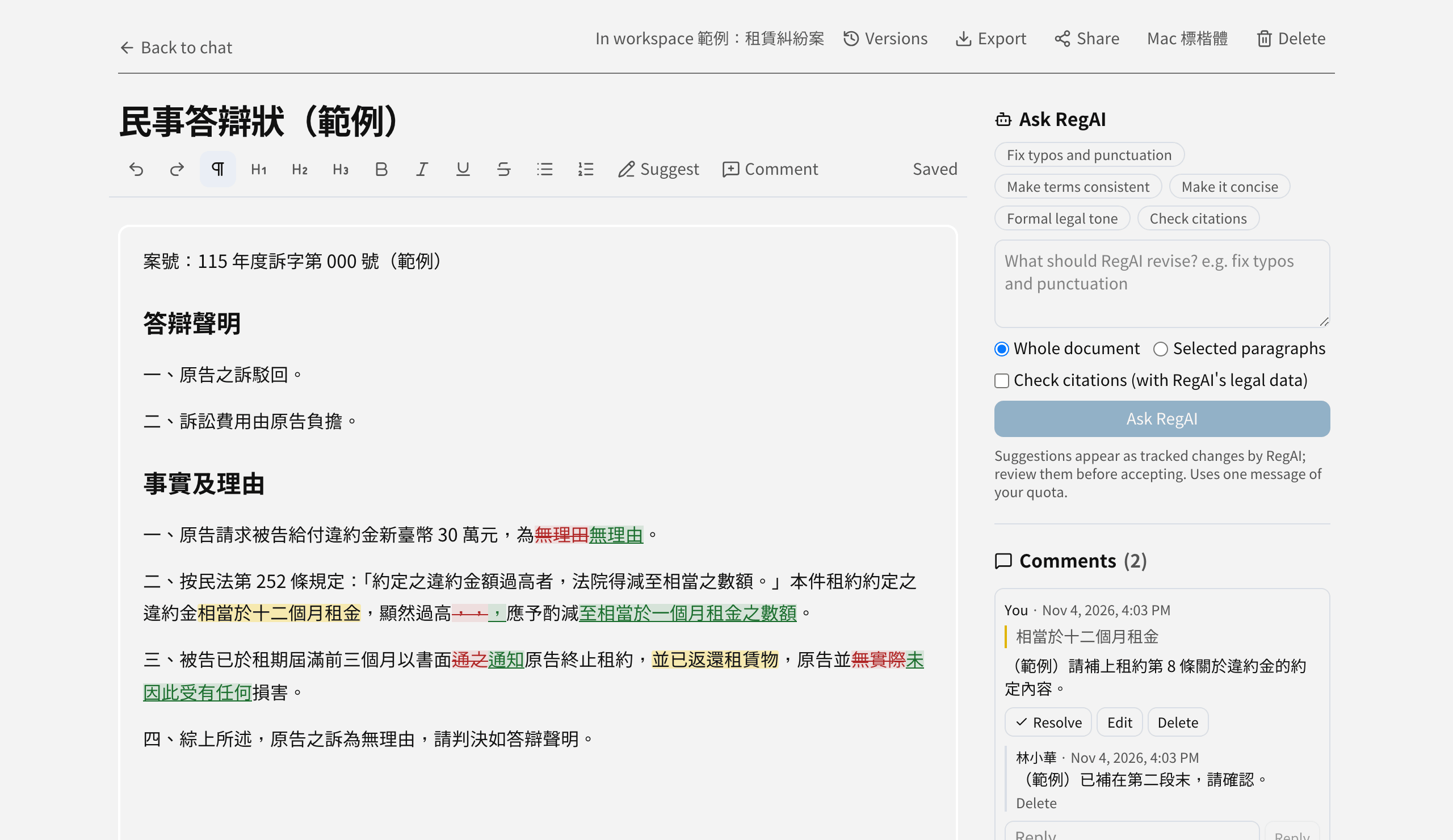
A tour of the page
- Top: the document title (click it to rename), Versions, Export, Share, Mac 標楷體 and Delete.
- Toolbar: undo, redo, body text and headings, bold and other formatting, lists, Suggest mode and Comment, with the save status on the right. Your work is saved automatically.
- Right: Ask RegAI, Comments, Suggestions, and the Citation check after a check has run.
Use a document in chat
In the workspace's Documents, click the Attach to query icon next to the document to ask questions about it. Each time you ask, RegAI reads the document as it is at that moment, as if every suggestion were accepted.
On a phone
A phone or other narrow screen is good for reading and reviewing suggestions. For drafting and larger edits, use a computer.