
RegAI Docs › RegAI Editor
Accept and reject suggestions
The list of suggestions
Suggestions on the right lists every pending suggestion in the document, grouped by author: RegAI, "You", other Group members, and authors imported from Word. RegAI's suggestions show their reason.
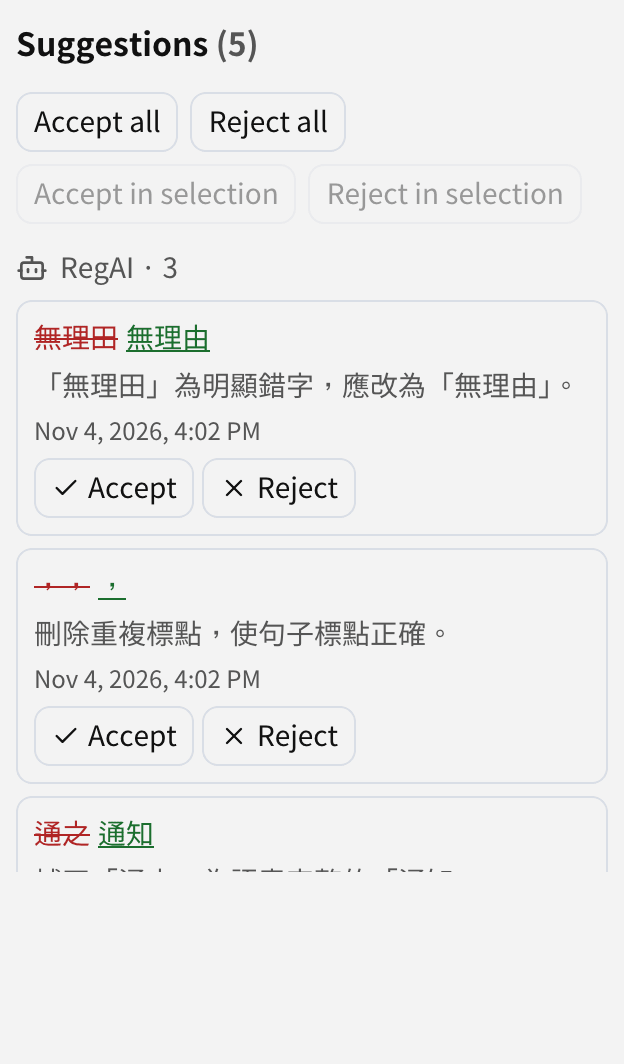
Click a suggestion in the list to scroll to it in the document; click a change in the document to highlight it in the list.
Accept or reject
- One: click Accept or Reject on the suggestion.
- All: click Accept all or Reject all.
- A range: select some text in the document and click Accept in selection or Reject in selection; only the suggestions in that range are affected.
Accepting an addition makes the text part of the document; accepting a deletion removes the text. Rejecting puts things back as they were.
After you accept or reject, a version is saved automatically, so you can restore it if needed.
On a narrow screen
On a phone or other narrow screen, Show suggestions opens the list and Hide suggestions closes it.
Suggestions not decided yet
Pending suggestions stay in the document. When you export to Word you choose: as tracked changes, all accepted, or without the suggestions. See Export and import Word.