
RegAI Docs › RegAI Editor
Ask RegAI and check citations
Ask RegAI
- Under Ask RegAI on the right, pick a quick instruction, or type what RegAI should revise.
- Choose the scope: Whole document or Selected paragraphs (select them in the document first).
- Click Ask RegAI.
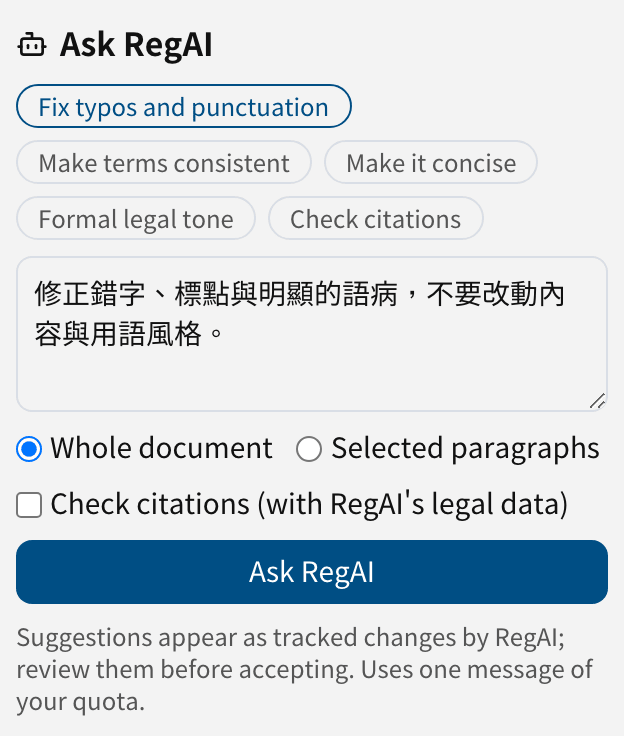
The quick instructions are Fix typos and punctuation, Make terms consistent, Make it concise, Formal legal tone and Check citations.
Progress shows while RegAI reads. When it is done, RegAI's changes appear in the document as suggestions by "RegAI", each with its reason. RegAI never changes your document directly: each suggestion takes effect only when you accept it.
Caution: RegAI's suggestions can be wrong. Review each one before accepting it, especially changes to article numbers, amounts, dates and parties.
The result
- N suggestions placed: review them under Suggestions.
- N could not be placed: RegAI proposed a change to text that was not found, or found more than once. They are listed so you can make the change yourself.
- RegAI found nothing to change: the document stays as it was.
A version is saved automatically before RegAI's suggestions, so you can restore it if needed.
Usage and limits
- Each Ask RegAI uses one message of your chat allowance. See Pricing.
- A document can have up to about 300,000 characters; a citation check up to 60,000.
Check citations
Pick the Check citations quick instruction, or tick Check citations (with RegAI's legal data) and type your own instruction:
- RegAI first looks up every article, 釋字 and 憲判字 cited in the document in RegAI's legal data, and compares quotations with the source.
- Then, from the results and a search of the data, it proposes suggestions, such as a corrected article number or a better citation.
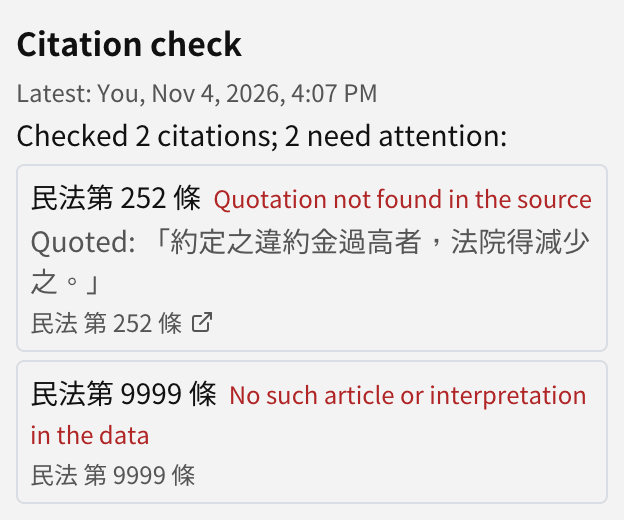
The check takes about 30 to 60 seconds. The result appears under Citation check on the right:
| Result | Meaning |
|---|---|
| Matches | The article exists and the quotation matches the source |
| Quotation differs slightly from the source | Small differences; check them |
| Quotation not found in the source | The quoted text is not in that article |
| No such article or interpretation in the data | RegAI's data has no such article or number |
| Could not check | The law name was not recognised, or the lookup failed |
Click a result to select the citation in the document; Open the source shows the article. The latest check is kept with the document, and Group members who open it see who ran it and when.
Tip: court decisions cited by case number are not listed in the check; RegAI looks them up when it searches the data.